Friday, September 12, 2014
How to Check What’s your Computer IP address On Windows XP
Here we will learn how to check our computer IP address on Windows XP.
Let’s get started!
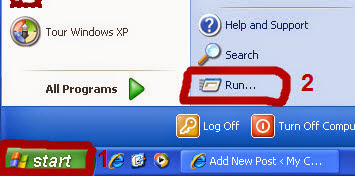
1) press the “Start” button
2) press the “Run” button
pic:
3) After you open the Run button write “CMD”
4) Next press “OK”
pic:

5) A window will open up. Next, write “ipconfig”. Press ENTER
pic:

6) After pressing ENTER your IP address will show up.
pic:


Subscribe to:
Post Comments (Atom)
No comments: