Sunday, September 14, 2014
Make An Invisible Folder
Make an invisible folder. You always wanted that no one will enter your folder and see your private files as movies songs documents and more? If you’re answer is yes you are in the right place now we will learn how to make an invisible folder okay let’s get started!
First make a new folder then rename it now price “Alt” and on your “Num Lock” pad press 2,5,5 and then let go of “Alt” and there you have no name now right click on the folder and press “properties”in the tab “customized” press “change icon”and choose the icon with no picture and then press okay and again okay and there you go your folder is invisible.
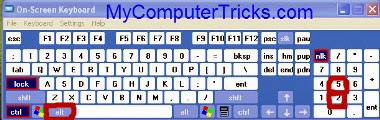
“then rename it now price “Alt” and on your “Num Lock” pad press 2,5,5″

“press “properties”in the tab “customized” press “change icon”and choose the icon with no picture”

No comments: